Platform · Brennimark Fonts
The font manager built for people who work with brands.
Local library, reliable activation and fonts organized by brand and by client. The goal is to be the best font manager for art directors, agencies and studios.
Closed beta, free, by invitation · first 50 only · 90 days · macOS and Windows · Linux in preparation
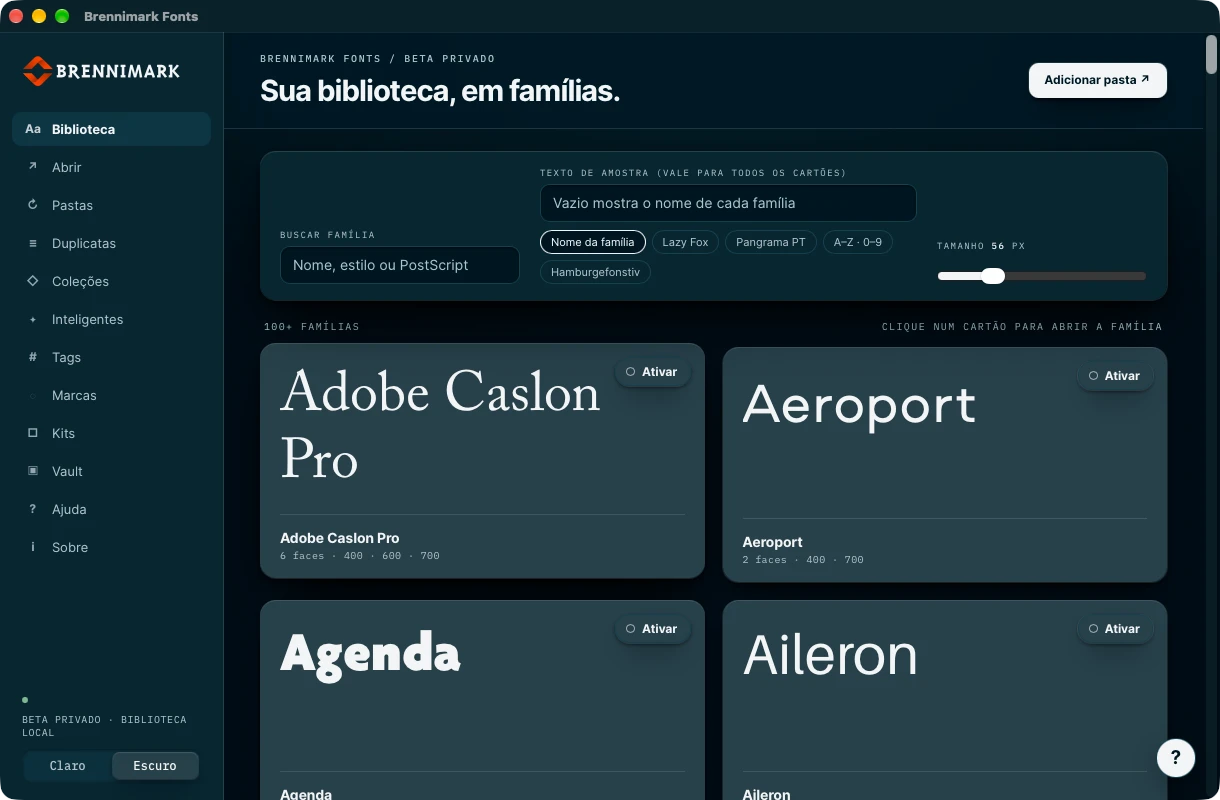
The library by family: each card is drawn with the real font.
What the beta does today
Twelve features that already work.
- Local library, no cloudCatalog on your computer. Works without internet and without an account; network features, when they arrive, come turned off.
- Imports without touching the originalsPoint to a folder and Fonts catalogs TTF, OTF and TTC/OTC collections. It doesn't copy, install or delete anything.
- Every font has an identityEach file is recognized by its fingerprint (SHA-256). An exact duplicate is found even under a different name.
- Font VaultWhenever you want, it keeps a managed copy of the font. Removal goes to a recoverable area; there is no permanent deletion.
- Really activates and deactivatesTemporary activation on macOS and Windows, with name-conflict control and recovery if the app closes midway.
- Families, not loose filesA family's styles stay together, searchable by family, weight, style and variable-font axes.
- Typographic previewGlyphs by Unicode block, OpenType features (ligatures, small caps, alternates), variable axes and a Playground with CSS.
- Collections, brands and kitsOrganize by project and by client. A kit gathers a brand's fonts to activate them all at once.
- Watched foldersFonts follows folders and notices what came in, changed or disappeared. An offline folder doesn't turn into lost fonts.
- Tags and smart collectionsFree-form labels and collections that build themselves from rules (for example, sans with Bold weight and italic).
- Similar fontsCompares shapes measured in the file itself and shows similar alternatives within your library.
- Diagnostics that don't leakThe About screen generates a support summary with version and system. It never includes paths, font names or clients.
In development
What comes next.
Nothing on this list is in the beta. It is on the roadmap, in this order of priority, and only appears on the site as ready after being tested.
- Automatic activation when a document is opened (reading InDesign, Photoshop and Illustrator)
- Google Fonts, optional and off by default
- Synchronization between computers through the Brennimark account
- Brennimark account and license inside the app, and automatic updates
- Linux
- Languages and themes
Honest comparison
Against FontBase, the strongest competitor.
Highlighted = whoever has the advantage on that row. FontBase data comes from its public website as of Oct 14, 2026 and may have changed; we have not tested its app in depth. Today FontBase has more features ready and runs on Linux. Our bet is the font tied to the brand: a kit per client, activation with conflict control and the brand manual in the same place.
Beta and installation
What to expect when installing.
Only the first 50 approved requests, on macOS and Windows. Each invitation lasts 90 days. It may have flaws and change. Linux comes later.
90 daysThe installer is not signed yet. macOS and Windows will warn that the source is not verified; the questions section shows the step by step.
ExpectedComing soon, with a signed installer and an annual license. When the 90 days are over, those who tested move to the paid version on launch terms, to be announced.
SoonQuestions
About the beta.
Why the system warning when installing?
The warning appears because this beta does not yet have a digital distribution signature (Apple and Microsoft charge for certificates, which we will purchase before the official launch). It does not indicate a problem with the file: macOS and Windows are only warning that they don't know the author. The installer comes directly from us, with the checksum so you can confirm that the file is the same.
How do I open it on a Mac?
When you open it for the first time, macOS warns that it cannot verify the app. Go to System Settings, Privacy & Security, scroll to the message about Brennimark Fonts and choose Open Anyway. The beta is for Macs with an Apple chip; Intel has not been tested yet.
How do I open it on Windows?
SmartScreen shows Windows protected your PC. Click More info and then Run anyway. The installer is per user and does not ask for administrator permission. Tested on Windows 11.
Do my fonts go to any server?
No. The catalog, the Vault copies, the collections and the kits stay on your computer. The support summary never carries a font name, path or client.
Can I trust my working library to a beta?
Fonts doesn't delete or alter the originals. Even so, it is a beta: start with a test folder and keep your usual backup.
Is the beta paid? How long is it valid?
It isn't paid, and it is by invitation, limited to the first 50 approved requests. Once you request access, we review it and send the installer; the trial is valid for 90 days. After that, you need to move to the paid version, which will be ready by then.
What if the 50 spots run out?
The beta does not open spots beyond the 50. Whoever is left out can ask for the launch notice, at the top of the page, and use Fonts included in the Brennimark subscription or in the standalone version, when it is released.
When is the official launch?
Soon, with no fixed date. The paid version is a one-year license, with updates and new versions during its validity; after that, it renews. Whoever subscribes to Brennimark already receives Fonts. Whoever tests the beta gets launch terms, which we will announce before any charge.
See also